showing online-go.com games on an e-ink inkplate display
i find deep beauty in the game of go. i've always been fascinated with how much meaning is imbued into decisions players make. this meaning makes moves memorable. lee sedol vs alphago game 4 move 78 (image generated with julianandrews/sgf-render)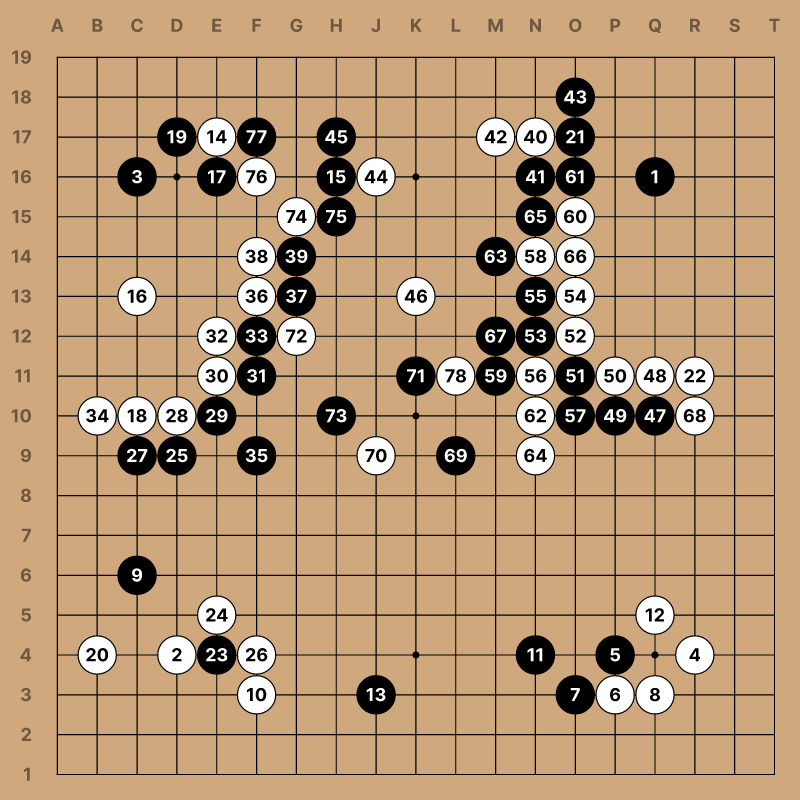
when i started visiting my local go club, i was astounded by how dan-level players could replay our entire game (with hundreds of moves!) from memory, talking through each decision they considered and the relative strengths of each path. while i struggled to recall what (and why) i had played in a given position when prompted, they could narrate the game as if it were a story, with the deeper meaning and themes that i had failed to grasp graciously presented before me.
there was a wide range of skills and attitudes at the club. some other players, closer to my own rank, would meticulously record every move that we played over the board on their phones using special software. they explained that this software could render our moves into SGF files, which could then be analyzed with computer go software, or shared with other mentors.
i was familiar with the SGF format from my time playing on the online-go.com (OGS) servers. for any game played on the server, you can download an SGF record with their public API.
in a very real sense, our game records are reflections of ourselves: who we are, who we've been, and who we struggle to become. the game is like a mirror. if we play with honesty, it can help reveal our biases, our strengths, our delusions, our hunger, and our potential. i feel such a range of emotion when i revisit past games. i am grateful that post-game review has been an opportunity to develop humility, self-compassion, self-confidence, and a fighting spirit in every area of my life.
relatedly, i recently acquired an Inkplate TEMPERA4 ESP32-WROVER 600x600 pixel e-ink display. inkplate devices come with a well-documented arduino library with extensive example code. the display refresh time is around 1 second, with a 200ms 1-bit mode fast partial refresh available. the arduino board definition gives access to 4MB of flash storage (3MB on the application partition for firmware).
with these creative constraints, i wanted to build something that was visually additive. go starts with an empty board, and stones are added over time. while the game is adversarial, players work together to fill the canvas with shape, structure, direction, and intention. clarity emerges over time as possibilities collapse under pressure, and potential becomes concrete. i felt as though the inkplate tempera4 was an excellent device for displaying go. ogs-inkplate displaying a game i played online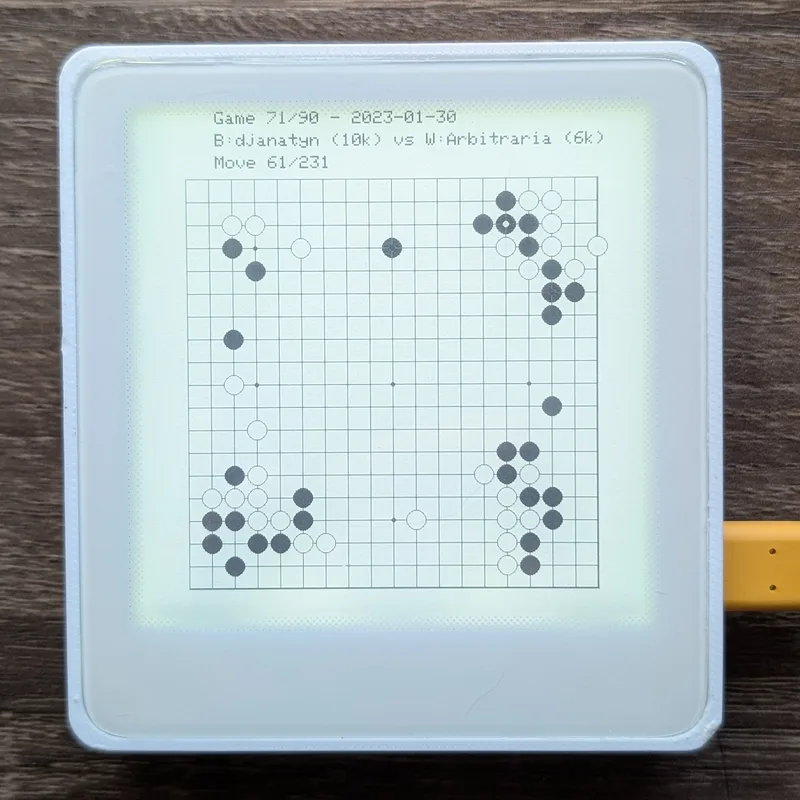
to accomplish this, i wrote a small rust client for the OGS API, archived my game results in a sqlite3 database, built an embedded go engine in C++ handling captures, compressed my game records into C++ header files, wrote a C++ snapshot validator program that is executed from rust tests to ensure that my engine's replays of generated header files match the SGF files, and added a screenshot command over serial to extract pixel data from the internal framebuffer!
in this article, i'll use the terms "baduk" and "go" interchangeably. baduk 바둑 is the Korean name for the game of go.
acquiring the games
to get started, i needed to fetch my game records. i wrote a small rust crate, ogs-fetch, which used the /api/v1/players/{id}/games API to enumerate my game records.
let url = format!(
    "https://online-go.com/api/v1/players/{}/games/?page_size={}&page={}&source=play&ended__isnull=false&height={}&width={}&ordering=-ended",
    user_id, page_size, page, board_size, board_size
);
i did not want to visualize every game record available. there are several reasons a game can come to an end, and some games might end before a move is even played. to keep the visualization consistent, i applied some filtering on game results, skipping:
- games started with handicap stones,
- games ended by resignation,
- games ended by disconnect,
- games ended by a timeout,
- games that were manually cancelled, and
- games that were annulled (usually a tournament match with a disqualified opponent)
pub fn is_valid_game_outcome(outcome: &str) -> bool {
    !outcome.contains("Resignation")
        && !outcome.contains("Timeout")
        && !outcome.contains("Disconnect")
        && !outcome.contains("Cancelled")
        && !outcome.contains("Annulled")
        && (outcome.contains("points") || outcome.contains("+"))
}
there's no reason to download SGF files for games we don't intend to render, so i stored game results from the API in a sqlite3 database first, which makes fetch-results and fetch-games two separate steps.
let game = Game {
    game_id: result.id,
    black_player: result.players.black.username.clone(),
    white_player: result.players.white.username.clone(),
    result: result.outcome.clone(),
    date: result.ended.clone(),
    downloaded: false,
};
db.insert_game(&game)?;
valid_count += 1;
CREATE TABLE IF NOT EXISTS games (
game_id INTEGER PRIMARY KEY,
black_player TEXT NOT NULL,
white_player TEXT NOT NULL,
result TEXT NOT NULL,
date TEXT NOT NULL,
downloaded INTEGER DEFAULT 0,
created_at TEXT DEFAULT CURRENT_TIMESTAMP
);
CREATE TABLE IF NOT EXISTS fetch_state (
key TEXT PRIMARY KEY,
value TEXT NOT NULL,
updated_at TEXT DEFAULT CURRENT_TIMESTAMP
);i did some rate-limiting to reduce strain on OGS infrastructure, sleeping 1 second between each request. there's an attempt at resumability here: when fetching pages, we mark the last page that we saw in the database (UPDATE fetch_state SET value = ?, updated_at = CURRENT_TIMESTAMP WHERE key = 'last_page'), and when fetching SGF files, we skip files that have already been downloaded (SELECT game_id FROM games WHERE downloaded = 0).
cargo run --bin ogs-fetch -- fetch-results \
    --user-id 435842 \
    --board-size 19 \
    --db ./19x19.db
Fetching game results for user 435842 (board size: 19x19, page size: 100)
Resuming from page 0
Fetching page 1...
Found 100 games on this page
...
Skipping game 34754081 (outcome: Resignation)
Skipping handicap game 32951640 (handicap: 5)
Skipping game 34082671 (outcome: Resignation)
Skipping game 32731877 (outcome: Timeout)
Skipping handicap game 32896002 (handicap: 2)
Added 19 valid games to database
...
Fetching page 10...
Reached end of results (page 10 not found)
Total games in database: 90$ cargo run --bin ogs-fetch -- fetch-games \
--board-size 19 \
--db ./19x19.db \
--output-dir ./19x19-sgfsFetching SGF files to directory: ./19x19-sgfs (board size: 19x19)
Found 90 games to download
Downloaded 1/90 (1 total) - Game 45641686
Downloaded 2/90 (2 total) - Game 49763279
Downloaded 3/90 (3 total) - Game 49853014
Downloaded 4/90 (4 total) - Game 49950251
Downloaded 5/90 (5 total) - Game 50646651
...
Download complete!
Downloaded 90 out of 90 total gamesi ended up with 90 games (21,277 moves), which seemed more than enough.
if i displayed each position for 8 seconds, that means my display has almost 48 hours of gameplay to observe!
choosing a data representation
i wanted the display to function even without internet access, so i chose to store the game replay data on the device. implementing even a subset of parsing the SGF specification in C++ felt intimidating, but i didn't need to: i just needed to translate the SGF file into a sequence of moves that the arduino code could understand and replay.
the simplest encoding (which does not require implementing any game logic on the device) is to record the state of the board at every move. this representation is repetitive: instead of storing a single coordinate for each move, we would be storing the state of 19x19=361 coordinates for every move, and each coordinate could be black, white or empty.
if we naively used one byte per cell, 21,277 moves requires 7.68MB (21,277 moves * 361 cells * 1 byte), which already exceeds the flash storage we have available! we could use bit-packing to get that down to 2 bits per cell (since we have 3 possible states, we need at least 2), but we'll never reach the same efficiency as storing the moves by themselves - it'll still be at least 1.92MB (21,277 moves * 361 cells * 2 bits).
instead of storing every intermediate state, i stored the sequence of moves themselves. this makes the board state derived data: we apply our compact representation against an empty board and build it up step-by-step to reconstruct the corresponding position. since we show games sequentially, this isn't expensive: we are only evaluating one board, and one move, at a time.
this made generating headers simpler, but required the arduino code to resolve capture logic. thankfully, this wasn't a problem: the capture rules in go are very simple to implement.
there are 361 points on a 19x19 board. we can assign every coordinate on the board a unique number. the numbering i chose is (col * board_size) + row, with zero-based indexing.
that means:
- the top left corner
(0,0)is0, - the top right corner
(18,0)is342, - the bottom left corner
(0,18)is18, and - the bottom right corner
(18,18)is360.
if we reserve 0xFFFF for a pass, uint16_t is sufficient to encode a move.
let position = (col_num * board_size + row_num) as u16;in retrospect, this was a bit awkward. there are 3 separate incompatible coordinate systems at play:
- SGF Coordinates are pairs of letters (col, row), with an origin at the top-left (
(a,a) -> (s,s)), - My encoding is built from pairs of integers (col, row), with an origin at the top-left (
(0,0) -> (18,18)), and - Go coordinates are a lettered column and a numbered row , which skips the letter I because it looks like 1 (?!), with an origin at the bottom-left (
A1 -> T19: the lower left point atA1, and the upper right point atT19).
go coordinates are weird!
to demonstrate with an example, here's the encoding described above with a very short game:
// Game 86: 143 moves (from 9632069.sgf)
const uint16_t GAME_86_MOVES[] PROGMEM = {
    288, 59, 281, 72, 249, 174, 244, 85,
// ...
    259, 277, 297, 45, 320, BADUK_PASS_MOVE, BADUK_PASS_MOVE,
};
the first move is 288. since our encoding means 288 = (col * 19) + row, integer division gives us the column, and the remainder gives us the row:
  col = encoded_move / BADUK_BOARD_SIZE;
  row = encoded_move % BADUK_BOARD_SIZE;
some quick maths:
>>> position = 288
>>> board_size = 19
>>> col = position // board_size
>>> row_from_top = position % board_size
>>> row_from_bottom = board_size - row_from_top
>>> col, row_from_top, row_from_bottom
(15, 3, 16)
>>> ['a','b','c','d','e','f','g','h','j','k','l','m','n','o','p','q','r','s','t'][15]
'q'
so, we'd expect the first stone to be placed at Q16. our transformation between representations is beginning to unfold:
| representation | first move |
|---|---|
| SGF | ;B[pd] |
| integer coordinates | (15, 3) |
| encoded value | 288 |
| go coordinates | Q16 |
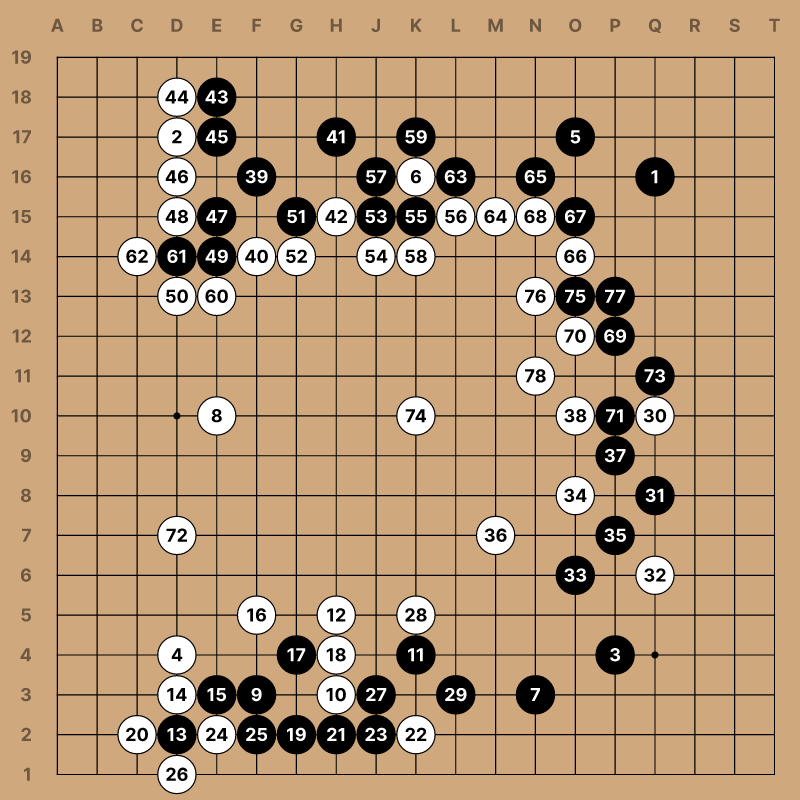
short game (kifu)
ok! confusing, but it's consistent, and we don't need to think about it too hard.
#[test]
fn test_parse_sgf_moves() {
    // Test with proper SGF game structure
    let sgf = "(;FF[4]GM[1];B[pd];W[dp];B[pq])";
    let moves = parse_sgf_moves(sgf, 19);
    assert_eq!(moves.len(), 3);

    // Verify first move is pd -> (15, 3) -> 15*19+3 = 288
    assert_eq!(moves[0], 288);
}
generating firmware header files
the choices above established my data format, for better or for worse:
- moves are
uint16_tnumbers, - games are immutable structs in flash memory, with
- a pointer to an immutable sequence of moves (also in flash memory), and
- an immutable total move count,
- a board is a mutable 19x19 array of
uint8_tnumbers in RAM, where- 0 represents
BADUK_EMPTY(an unoccupied square), - 1 represents
BADUK_BLACK(a black stone), and - 2 represents
BADUK_WHITE(a white stone)
- 0 represents
the board keeps track of some additional mutable state:
- the index of the current game being played,
- the index of the last move played,
- the total number of moves in the current game,
- the last row updated, and
- the last column updated
these help render the board onto the screen with appropriate metadata after the board has been updated with the previous move.
#define BADUK_BOARD_SIZE 19
#define BADUK_EMPTY 0
#define BADUK_BLACK 1
#define BADUK_WHITE 2
#define BADUK_NO_LAST_MOVE 255
#define BADUK_PASS_MOVE 0xFFFF

struct BadukGameRecord {
  const uint16_t *moves;
  uint16_t move_count;
};

struct BadukState {
  uint8_t board[BADUK_BOARD_SIZE][BADUK_BOARD_SIZE];
  uint16_t game_index;
  uint16_t move_index;
  uint16_t move_count;
  uint8_t last_row;
  uint8_t last_col;
};
after we've generated every game, we create a BadukGameRecord GAMES[] table and store the total GAME_COUNT:
const BadukGameRecord GAMES[] PROGMEM = {
    { GAME_0_MOVES, 216 },
// ...
    { GAME_89_MOVES, 232 },
};

const uint16_t GAME_COUNT = 90;
each BadukGameRecord in the GAMES table is small: just a count of total moves in the game, and a pointer to those moves. we can quickly copy any BadukGameRecord into RAM without copying the moves array itself, and we can use the moves pointer to retrieve the next move from flash whenever it's needed.
GameMetadata is similar: it's a small struct with pointers to strings in flash memory, so we can copy it into SRAM and use the pointers to look up these immutable strings at runtime:
struct GameMetadata {
  const char *date;
  const char *black_player;
  const char *white_player;
  const char *black_rank;
  const char *white_rank;
};
const char GAME_0_DATE[] PROGMEM = "2017-09-23";
const char GAME_0_BLACK[] PROGMEM = "djanatyn";
const char GAME_0_WHITE[] PROGMEM = "wang.bigstone1";
const char GAME_0_BLACK_RANK[] PROGMEM = "12k";
const char GAME_0_WHITE_RANK[] PROGMEM = "1k";
const char GAME_1_DATE[] PROGMEM = "2017-09-28";
const char GAME_1_BLACK[] PROGMEM = "djanatyn";
const char GAME_1_WHITE[] PROGMEM = "aliebling";
const char GAME_1_BLACK_RANK[] PROGMEM = "11k";
const char GAME_1_WHITE_RANK[] PROGMEM = "10k";
// ...
const GameMetadata GAMES_METADATA[] PROGMEM = {
{ GAME_0_DATE, GAME_0_BLACK, GAME_0_WHITE, GAME_0_BLACK_RANK, GAME_0_WHITE_RANK },
{ GAME_1_DATE, GAME_1_BLACK, GAME_1_WHITE, GAME_1_BLACK_RANK, GAME_1_WHITE_RANK },
{ GAME_2_DATE, GAME_2_BLACK, GAME_2_WHITE, GAME_2_BLACK_RANK, GAME_2_WHITE_RANK },
// ...
{ GAME_89_DATE, GAME_89_BLACK, GAME_89_WHITE, GAME_89_BLACK_RANK, GAME_89_WHITE_RANK },
};it would make sense to generate these headers with a structured template library like tera, but i just concatenated strings very carefully this time: the codegen is less interesting than the generated code.
i wrapped this header generation in a compress-games subcommand:
$ cargo run --bin ogs-fetch -- compress-games \
  --input-dir 19x19-sgfs/ \
  --board-size 19 \
  --output-dir ../arduino \
  --max-games 1000
Compressing games from directory: 19x19-sgfs/ (board size: 19x19)
Max games to compress: 1000
Compressed game 1 (216 moves) from 10069202.sgf (djanatyn vs wang.bigstone1 on 2017-09-23)
Compressed game 2 (240 moves) from 10118120.sgf (djanatyn vs aliebling on 2017-09-28)
...
Compressed game 90 (232 moves) from 9973821.sgf (djanatyn vs Tatapaulette on 2017-09-13)
Compressed 90 games total
Compression Statistics:
Total games: 90
Total moves: 21277
Average moves per game: 236
Estimated data size: 42826 bytes
Generating C header files in: ../arduino
Generated: ../arduino/generated_games_data.h
Generated: ../arduino/generated_games_metadata.h
Compression complete!when we compile, our PROGMEM objects become part of the firmware image, stored in flash memory on the ESP32-WROVER :)
reading generated data from flash memory
we want to avoid loading every game's set of moves into SRAM. instead, we load pointers to game moves!
you'll recall that our BadukGameRecord struct is small when initialized in flash memory, and only includes a pointer to moves (not the moves directly):
struct BadukGameRecord {
  const uint16_t *moves;
  uint16_t move_count;
};
when a game begins, we can copy an initialized struct from flash into SRAM:
BadukGameRecord game;

memcpy_P(&game, &GAMES[game_index], sizeof(BadukGameRecord));
memcpy_P copies the struct into SRAM, but doesn't follow the pointer. instead, when we need to read a move, we use the game.moves pointer to retrieve the appropriate move_index from flash using pgm_read_word:
encoded_move = pgm_read_word(&game.moves[state->move_index]);metadata works similarly, but instead of using pgm_read_word, we use strcpy_P to retrieve the string from flash memory into temporary buffers in SRAM:
// Read metadata from PROGMEM
GameMetadata metadata;
memcpy_P(&metadata, &GAMES_METADATA[baduk_state->game_index],
        sizeof(GameMetadata));
// ...
char dateBuffer[11];
strcpy_P(dateBuffer, metadata.date);
display->println(dateBuffer);
processing moves
ok: we have our game data and we can access it at runtime. now that we have access to our moves, we need code to evaluate a move against a board!
if you recall that this is our state:
struct BadukState {
  uint8_t board[BADUK_BOARD_SIZE][BADUK_BOARD_SIZE];
  uint16_t game_index;
  uint16_t move_index;
  uint16_t move_count;
  uint8_t last_row;
  uint8_t last_col;
};
we'll need some functions to:
- reset the state (clear the board for the next game),
- load a game into memory, (setting up the board's
game_index,move_index, andmove_count), and - to play an encoded move (given a
color, because players can pass)
void baduk_reset(
    BadukState *state
);

uint8_t baduk_load_game(
    BadukState *state,
    const BadukGameRecord *games,
    uint16_t game_count,
    uint16_t game_index
);

uint8_t baduk_play_next_move(
    BadukState *state,
    const BadukGameRecord *games
);

uint8_t baduk_play_move(
    BadukState *state,
    uint16_t encoded_move,
    uint8_t color
);
building a baduk engine
placing a stone involves 5 steps:
- decode the
uint16_tmove into a (row, col) coordinate, - place the stone temporarily, pending validation,
- remove neighboring enemy groups with no liberties,
- make sure the placed stone's group has a liberty, and finally
- freak out if the placed stone is a suicide (that's not legal!)
calculating neighbors is just applying cardinal offsets to the target coordinate, and then looping through next_row and next_col:
int dirs[4][2] = {
    {-1, 0},
    {1, 0},
    {0, -1},
    {0, 1},
};
if (state->board[next_row][next_col] == enemy) {
uint8_t visited[BADUK_BOARD_SIZE][BADUK_BOARD_SIZE] = {0};
if (!baduk_group_has_liberty(state, next_row, next_col, visited)) {
baduk_remove_group(state, next_row, next_col);
}
}tracking liberties is a prerequisite, and more complex. we use depth-first search, pushing the coordinate of neighboring friendly stones onto a stack, and visiting each neighbor exactly once. if we ever find an empty neighboring point for any adjacent friendly stones, then the group is (currently) alive, and we terminate early. if we exhaust our stack and fail to find any empty neighboring points, we've checked every stone in the group, and none have liberties: the group is captured.
if (state->board[next_row][next_col] == color && visited[next_row][next_col] == 0) {
    visited[next_row][next_col] = 1;
    stack_row[stack_size] = next_row;
    stack_col[stack_size] = next_col;
    stack_size++;
}
we have to resolve captures before checking suicide rules because a move that initially has no liberties might gain liberties after it captures adjacent enemy groups. this is a common situation when fighting for life and death inside of an eye space. if we checked for suicide first, we would reject all of those killing moves as invalid. instead, we resolve captures first, and then check for validity.
we don't expect to encounter any invalid moves (after all, these games have already finished!), but if we do, it's informative: we've likely introduced some logic error in another part of our code.
our baduk_remove_group function works very similarly to the baduk_group_has_liberty and uses depth-first search. instead of checking for liberties, it just removes adjacent connected stones, replacing them with BADUK_EMPTY.
how do we know our engine works?
don't let yourself think i got this right the first time: i forgot that passes exist :') the engine needs some external validation that it's functioning properly.
this was much easier than i expected using snapshot testing!
if we wanted to be sure our engine evaluated moves correctly, it would help to have another engine that we were confident is correct. if we believed in this Hypothetical Probably Correct Engine, we could compare the results of the two engines with the same sets of moves.
if the snapshots agree at each step, then both implementations agree on positions and rules, which is a strong indicator that our hand-written engine matches the logic of the Hypothetical Probably Correct Engine (or at least its evaluation of moves and positions)!
if any two steps diverge, we know 1). where our logic fails, 2). what the expected result is, and 3). what our computed result is, which is helpful information for debugging.
fortunately, that Hypothetical Probably Correct Engine exists, and it is called the goban crate:
Library to play with a rusty "Goban" (name of the board where we play Go !), It's built with performance in mind. The library can perform a full playout of a random game in 1.5 ms checking all legal moves.
conceptually, if our engine/baduk_engine.cpp code is correct, and we generate snapshots of each board position from our header file, it should match the snapshots generated from the goban crate exactly:
#[test]
fn generated_headers_match_sgf_replay() {
    let root = Path::new(env!("CARGO_MANIFEST_DIR"));
    assert_eq!(goban_snapshots(root), validator_snapshots(root));
}
this rust test will both:
- run
gobanto generate snapshots from a parsed SGF game, and also - run
validate_games.cpp(with the shared engine code) to generate snapshots from a compiled header file
you'll recall that our games are normally stored in flash memory with the PROGMEM macro. to make this work outside of the device, we have a small baduk_platform.h that uses conditional preprocessor macros to stub the arduino functions (memcpy_P, pgm_read_word, and pgm_read_byte), and to make PROGMEM a no-op:
#ifndef BADUK_PLATFORM_H
#define BADUK_PLATFORM_H

#ifdef ARDUINO
#include <Arduino.h>
#else
#include <stdint.h>
#include <string.h>

#ifndef PROGMEM
#define PROGMEM
#endif

#ifndef memcpy_P
#define memcpy_P(dest, src, size) memcpy((dest), (src), (size))
#endif

#ifndef pgm_read_word
#define pgm_read_word(addr) (*(const uint16_t *)(addr))
#endif

#ifndef pgm_read_byte
#define pgm_read_byte(addr) (*(const uint8_t *)(addr))
#endif
#endif

#endif
this means we can use the same functions in our tests that we use on our embedded device, with baduk_platform.h handling the differences.
we have enough context to look at the entire implementation now. the validate_games C++ program just loops through games printing out computed positions:
#include "baduk_engine.h"
#include "generated_games_data.h"
#include <stdio.h>

static void print_board(BadukState *state) {
  uint8_t row;
  uint8_t col;

  for (row = 0; row < BADUK_BOARD_SIZE; row++) {
    for (col = 0; col < BADUK_BOARD_SIZE; col++) {
      printf("%u", state->board[row][col]);
    }
  }
}

int main(void) {
  BadukState state;
  uint16_t game_index;

  for (game_index = 0; game_index < GAME_COUNT; game_index++) {
    if (!baduk_load_game(&state, GAMES, GAME_COUNT, game_index)) {
      printf("load_error %u\n", game_index);
      return 1;
    }

    printf("game %u moves %u\n", game_index, state.move_count);

    while (state.move_index < state.move_count) {
      if (!baduk_play_next_move(&state, GAMES)) {
        printf("move_error %u %u\n", game_index, state.move_index + 1);
        return 1;
      }

      printf("move %u ", state.move_index);
      print_board(&state);
      printf("\n");
    }
  }

  return 0;
}
our goban code does the same thing, with a few tweaks to respect the crate's conventions:
fn goban_snapshots(root: &Path) -> Vec<Vec<String>> {
    fixture_paths(root)
        .iter()
        .map(|path| {
            let sgf = fs::read_to_string(path).expect("failed to read SGF fixture");
            let moves = parse_sgf_moves(&sgf, BOARD_SIZE as u32);
            let mut game = Game::new(GobanSizes::Nineteen, CHINESE);
            let mut snapshots = Vec::new();

            for (move_index, encoded_move) in moves.iter().enumerate() {
                let move_to_play = if *encoded_move == PASS_MOVE {
                    Move::Pass
                } else {
                    let col = *encoded_move / BOARD_SIZE as u16;
                    let row = *encoded_move % BOARD_SIZE as u16;
                    Move::Play(row as u8, col as u8)
                };

                game.try_play(move_to_play).unwrap_or_else(|error| {
                    panic!(
                        "Goban rejected move {} in {:?}: {error:?}",
                        move_index + 1,
                        path
                    )
                });
                snapshots.push(board_snapshot(&game));
            }

            snapshots
        })
        .collect()
}
you'll note that both paths use the same sgf parsing and move encoding logic, which we assume is correct. the goal is to validate that the C++ engine code returns the same positions as our goban crate.
as you saw previously, assert_eq! is all we need at this point:
$ cargo test --test generated_headers \
    generated_headers_match_sgf_replay -- --nocapture
running 1 test
Compressed game 1 (250 moves) from 31064633.sgf (shelly613 vs djanatyn on 2021-02-13)
Compressed game 2 (231 moves) from 50646651.sgf (djanatyn vs Arbitraria on 2023-01-30)
Compressed game 3 (279 moves) from 65134095.sgf (Rembane vs djanatyn on 2024-06-13)
Compressed 3 games total
test generated_headers_match_sgf_replay ... ok
test result: ok. 1 passed; 0 failed; 0 ignored; 0 measured; 0 filtered out; finished in 0.21swe're only using 3 test fixture SGF games to validate in this test, as opposed to our previous 90 games downloaded.
we could do more, but i'd say that's good enough for me to ship!
there are more rules to go that i did not validate, including some rules that goban implements, but my engine does not. as an example, my implementation does not attempt to respect ko rules. it's ok, somebody else will check.
shuffling game order
i was admittedly surprised that i did not have access to an array shuffling function. i used the Fisher-Yates algorithm, which is functionally equivalent to repeatedly selecting a random card from remaining cards in a deck, until the deck is empty.
the GAMES[] array in flash is immutable, so i introduced a small GameOrder struct to translate sequential indexes into their shuffled equivalent:
struct GameOrder {
  uint16_t games[GAME_COUNT];
  uint16_t index;
};
the games[GAME_COUNT] field is just an array of indexes into GAMES[]. the field starts off sequential, but gets shuffled to mix up the ordering each time the device boots:
for (i = GAME_COUNT - 1; i > 0; i--) {
  uint16_t j = random(i + 1);
  uint16_t tmp = order->games[i];

  order->games[i] = order->games[j];
  order->games[j] = tmp;
}
there's a config.h setting to disable this if you'd like, but i prefer to leave it on for variety.
rendering the board
rendering is driven by preprocessor #define constants as much as possible:
#define GRID_SPACING 26 // Space between grid lines (px)
#define ACTUAL_BOARD_SIZE (GRID_SPACING * (BADUK_BOARD_SIZE - 1)) // 468px
#define HEADER_HEIGHT 40 // Space for game/move text at top
#define BOARD_OFFSET_X                                                         \
  ((600 - ACTUAL_BOARD_SIZE) / 2) // center horizontally = 66px
#define BOARD_OFFSET_Y                                                         \
  ((600 - HEADER_HEIGHT - ACTUAL_BOARD_SIZE) / 2 +                             \
   HEADER_HEIGHT)                      // center vertically with header margin
#define BOARD_WIDTH ACTUAL_BOARD_SIZE  // 468px
#define BOARD_HEIGHT ACTUAL_BOARD_SIZE // 468px
#define STONE_RADIUS 11 // Stone radius (slightly smaller than spacing)
converting go coordinates to on-screen pixels is essential, computed with BOARD_OFFSET_X, BOARD_OFFSET_Y, and GRID_SPACING:
static int display_pixel_x(int board_col) {
  return BOARD_OFFSET_X + (board_col * GRID_SPACING);
}

static int display_pixel_y(int board_row) {
  return BOARD_OFFSET_Y + (board_row * GRID_SPACING);
}
we can render the entire board to the framebuffer before we add any stones. the internal top-level function for this is display_draw_board:
static void display_draw_board(Inkplate *display) {
  display->setTextSize(1);
  display->setTextColor(BLACK);

  // Draw grid lines
  display_draw_grid_lines(display);

  // Draw hoshi (star) points
  display_draw_hoshi_points(display);

  // Draw board edge
  display->drawRect(display_pixel_x(0), display_pixel_y(0),
                    GRID_SPACING * (BADUK_BOARD_SIZE - 1),
                    GRID_SPACING * (BADUK_BOARD_SIZE - 1), BLACK);
}
the arduino inkplate library makes it very easy to draw lines, shapes, and text, especially when we have authoritative display_pixel_x and display_pixel_y functions.
it was quite fun to enumerate the hoshi points:
static void display_draw_hoshi_points(Inkplate *display) {
  // Hoshi (star) points on a 19x19 board
  int hoshis[9][2] = {{3, 3},  {3, 9},  {3, 15}, {9, 3},  {9, 9},
                      {9, 15}, {15, 3}, {15, 9}, {15, 15}};

  for (int i = 0; i < 9; i++) {
    int x = display_pixel_x(hoshis[i][0]);
    int y = display_pixel_y(hoshis[i][1]);
    display->fillCircle(x, y, 2, BLACK);
  }
}
these display_pixel_x and display_pixel_y functions really do drive everything, which is handy when tweaking the layout. once we've finished rendering our board, it tells us exactly where to draw the stones:
if (cell == BADUK_BLACK) {
  display->fillCircle(display_pixel_x(col), display_pixel_y(row),
                      STONE_RADIUS, BLACK);
} else if (cell == BADUK_WHITE) {
  display->drawCircle(display_pixel_x(col), display_pixel_y(row),
                      STONE_RADIUS, BLACK);
  display->fillCircle(display_pixel_x(col), display_pixel_y(row),
                      STONE_RADIUS - 1, WHITE);
}
wow! so cool! can i try it?
thank you, friendly reader! if you have an inkplate TEMPERA4, of course you can!
# run setup.sh first to install dependencies
arduino-cli compile \
    --upload \
    --fqbn soldered-inkplate-boards:esp32:Inkplate4TEMPERA:UploadSpeed=115200 \
    arduino \
    -p /dev/cu.usbserial-1410 # replace this with your usb serial device!
what's next for you?
a break. but after that:
- support for both 19x19 and 9x9 games,
- reading games from a microSD card,
- explaining the screenshot functionality in a subsequent blog post,
- touch-screen controls,
- frontlight controls,
- a battery display